The Problem
Geographic applications that run for decades share a recurring weakness: external map tile providers. Google Maps, Mapbox, HERE, they’re excellent until they aren’t.
The issues accumulate over the years:
- API deprecations: Providers shut down or change endpoints with minimal notice
- Pricing volatility: Free tiers shrink, usage costs spike unpredictably
- Rate limiting: Traffic peaks get throttled, breaking user experience
- Data sovereignty: User queries and bounding boxes flow through third-party servers
- Offline impossibility: No internet means no maps
- Vendor lock-in: Migration requires rewriting entire rendering layers
The Solution
A self-hosted vector tile stack built on PMTiles and Protomaps. Two technologies that together make self-hosting maps genuinely simple:
Protomaps Daily Builds (.pmtiles)
    ↓
go-pmtiles (serve archive)
    ↓
Nginx (proxy + static files)
    ↓
MapLibre GL JS (render in browser)
No tile generation. No database. No PostGIS. No import pipelines. One file. One server. Done.
Why PMTiles?
PMTiles is an archive format for tiled data, like a read-only SQLite for maps. A single .pmtiles file contains an entire planet (or region) worth of vector tiles, indexed for random access via HTTP Range requests.
This means:
- No tile server needed: Any static file server (Nginx, S3, Cloudflare R2) can serve tiles
- Single file: One
.pmtilesinstead of millions of individual.mvtfiles - Cloud-native: HTTP Range requests fetch only the bytes needed for the current viewport
- Atomic updates: Swap one file, you’re done
Why Protomaps?
Protomaps provides builds of the entire planet as PMTiles archives, derived from OpenStreetMap data. You download a file, you have the world.
The Architecture
Two Docker containers only: Pmtiles serves the archive via the PMTiles HTTP API. webserver serves static files (styles, sprites, fonts) and proxies tile requests.
# docker-compose.yml
services:
  pmtiles:
    image: protomaps/go-pmtiles
    container_name: pmtiles-server
    command: serve /data
    restart: always
    volumes:
      - ./data:/data

  webserver:
    image: nginx:alpine
    container_name: nginx-protomaps
    restart: always
    ports:
      - "80:80"
      - "443:443"
    volumes:
      - ./conf-sites/nginx.conf:/etc/nginx/nginx.conf
      - ./conf-sites/sites.conf:/etc/nginx/conf.d/default.conf
      - ./public:/usr/share/nginx/html:ro
    depends_on:
      - pmtiles
Nginx Configuration
Nginx is tuned for serving map tiles efficiently — gzip on protobuf, open file caching, reduced logging:
# nginx.conf
user  nginx;
worker_processes auto;

events {
    worker_connections 4096;
    multi_accept on;
}

http {
    include       /etc/nginx/mime.types;
    default_type  application/octet-stream;

    sendfile on;
    tcp_nopush on;
    tcp_nodelay on;

    keepalive_timeout 65;
    keepalive_requests 1000;

    client_body_buffer_size 128k;
    client_max_body_size 0;

    access_log off;

    gzip on;
    gzip_min_length 1024;
    gzip_types application/json application/javascript text/css application/x-protobuf;

    open_file_cache max=200000 inactive=20s;
    open_file_cache_valid 30s;
    open_file_cache_min_uses 2;
    open_file_cache_errors on;

    include /etc/nginx/conf.d/*.conf;
}
The site config proxies /tiles/ to go-pmtiles with CORS headers:
# sites.conf
server {
    listen 80;
    server_name maps.example.com;
    return 301 https://$host$request_uri;
}

server {
    listen 443 ssl;
    server_name maps.example.com;

    location / {
        root /usr/share/nginx/html;
        index index.html;
        try_files $uri $uri/ =404;
    }

    location /tiles/ {
        proxy_pass http://pmtiles:8080/;
        proxy_set_header Host $host;
        proxy_cache_bypass $http_upgrade;

        ...
    }
}
Map Styles
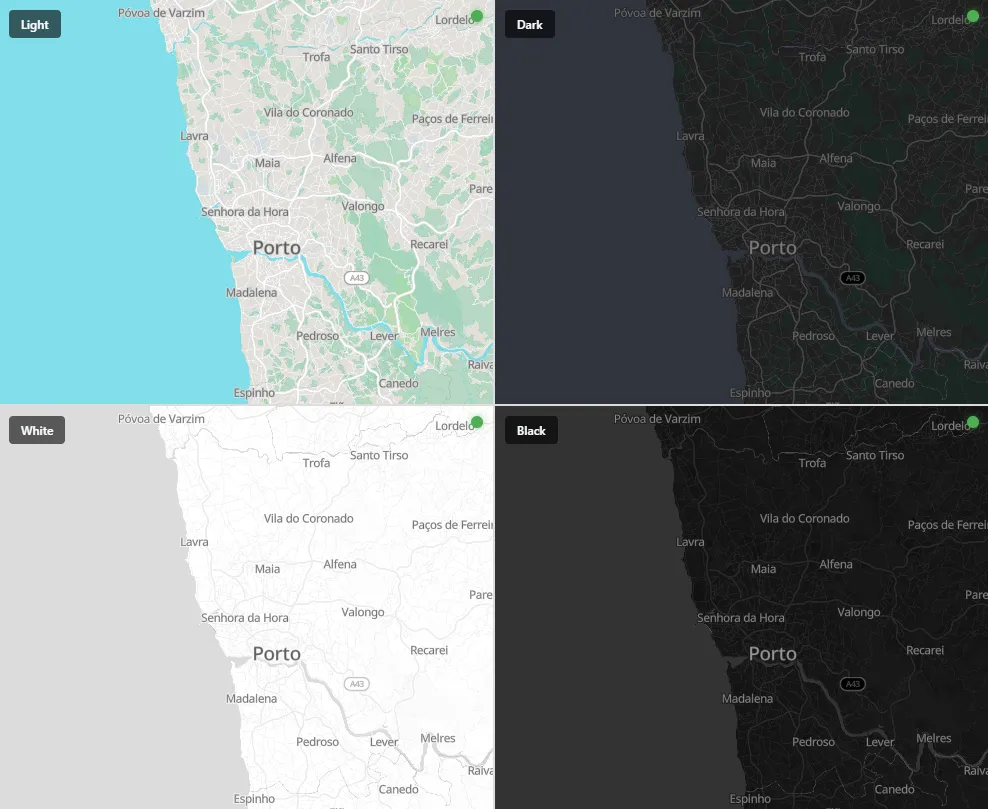
Four themes, all referencing the same PMTiles source, just different paint properties:
{
  "version": 8,
  "sources": {
    "protomaps": {
      "type": "vector",
      "tiles": ["https://maps.example.com/tiles/20260416/{z}/{x}/{y}.mvt"],
      "minzoom": 0,
      "maxzoom": 14
    }
  },
  "layers": [
    {
      "id": "background",
      "type": "background",
      "paint": { "background-color": "#34373d" }
    },
    {
      "id": "earth",
      "type": "fill",
      "source": "protomaps",
      "source-layer": "earth",
      "paint": { "fill-color": "#1f1f1f" }
    },
    {
      "id": "water",
      "type": "fill",
      "source": "protomaps",
      "source-layer": "water",
      "paint": { "fill-color": "#223143" }
    },
    ...
  ]
}
Each style file (light.json, dark.json, white.json, black.json) has roughly 12,000 lines and covers all layers, including land use, roads, buildings, waterways, POIs, transit, boundaries and typography. The structure is identical across themes; only the colors and text styling change.
You can download a standard template here: https://maps.protomaps.com/#flavorName=light&lang=en&map=1.19/0/0
How to Use
Just point your map to one of your self-hosted style files:
const center = [-8.70, 41.18];

const map = new maplibregl.Map({
    container: 'map',
    style: 'https://maps.example.com/light.json', // or dark.json, white.json, black.json
    center: center,
    zoom: 13,
    attributionControl: false
});
Automated Daily Updates
The update.sh script downloads the latest Protomaps daily build, creates an atomic symlink, and cleans up old versions:
#!/bin/bash
set -euo pipefail

BASE_URL="https://build.protomaps.com"
DATA_DIR="/opt/protomaps/data"
LOCK_FILE="/tmp/protomaps-update.lock"
MAX_RETRIES=3
RETRY_DELAY=10

if [ -f "$LOCK_FILE" ]; then
    echo "Another update is running. Exiting."
    exit 1
fi
trap "rm -f $LOCK_FILE" EXIT
touch "$LOCK_FILE"

cd "$DATA_DIR"
TODAY=$(date +%Y%m%d).pmtiles

# Download with retry
attempt=1
while [ $attempt -le $MAX_RETRIES ]; do
    echo "Downloading $TODAY (attempt $attempt)"
    rm -f "$TODAY"
    if wget -q "$BASE_URL/$TODAY"; then
        echo "Download successful"
        break
    fi
    echo "Failed, retrying in ${RETRY_DELAY}s..."
    sleep $RETRY_DELAY
    attempt=$((attempt + 1))
done

# Atomic symlink swap
ln -sfn "$TODAY" map.pmtiles

# Keep only last 3 versions
ls -1t *.pmtiles | tail -n +4 | xargs -r rm -f

echo "Update completed: map.pmtiles -> $TODAY"
Set it as a cron job and your maps update automatically:
# Every day at 3 AM
0 3 * * * /opt/protomaps/scripts/update.sh >> /var/log/protomaps-update.log 2>&1
One-Time Asset Setup
Sprites and fonts are global — download once:
#!/bin/bash
set -euo pipefail

ASSETS_URL="https://raw.githubusercontent.com/protomaps/basemaps-assets/main"
SPRITES_API="https://api.github.com/repos/protomaps/basemaps-assets/contents/sprites/v4"
PUBLIC_DIR="/opt/protomaps/public"

mkdir -p "$PUBLIC_DIR/sprites"
mkdir -p "$PUBLIC_DIR/fonts"

# Sprites (all themes)
curl -s "$SPRITES_API" | jq -r '.[].download_url' | while read -r url; do
    file=$(basename "$url")
    curl -s -L --fail --retry 3 -o "$PUBLIC_DIR/sprites/$file" "$url"
    echo "OK $file"
done

# Fonts (Noto Sans - covers Latin, CJK, Arabic, etc.)
declare -A FONTS=(
    ["NotoSansRegular"]="Noto%20Sans%20Regular"
    ["NotoSansMedium"]="Noto%20Sans%20Medium"
    ["NotoSansItalic"]="Noto%20Sans%20Italic"
)

for local_name in "${!FONTS[@]}"; do
    remote_name=${FONTS[$local_name]}
    mkdir -p "$PUBLIC_DIR/fonts/$local_name"

    for i in {0..255}; do
        start=$((i * 256))
        end=$((start + 255))
        range="$start-$end.pbf"
        target="$PUBLIC_DIR/fonts/$local_name/$range"

        if [ ! -f "$target" ]; then
            curl -s -L --fail --retry 3 \
                -o "$target" \
                "$ASSETS_URL/fonts/$remote_name/$range" || true
        fi
    done
    echo "OK $local_name completed"
done
Directory Structure
maps/
├── docker-compose.yml
├── conf-sites/
│   ├── nginx.conf
│   ├── sites.conf
│   └── certs/
│       ├── cert.pem
│       └── priv.pem
├── data/
│   └── 20260416.pmtiles
├── scripts/
│   ├── update.sh
│   └── update-assets.sh
└── public/
    ├── light.json
    ├── dark.json
    ├── white.json
    ├── black.json
    ├── sprites/
    │   ├── light.json
    │   ├── light.png
    │   ├── light@2x.json
    │   └── ...
    └── fonts/
        ├── NotoSansRegular/
        ├── NotoSansMedium/
        └── ...
Conclusion
Applications designed to last decades can’t depend on map providers whose business models shift quarterly. The Protomaps + PMTiles + MapLibre stack has reduced what used to require a full tile rendering pipeline (PostGIS, imposm, tilelive, etc.) to one file, two containers, and a cron job.
Your maps. Your server. Your rules.