This is Part 2 of the map sovereignty series. If you haven’t read Part 1 yet, check out Map Sovereignty - Self-Hosted Vector Tiles with Protomaps and PMTiles for the foundational setup.
The Problem
Vector tiles offer maximum flexibility. We can style everything client-side, change colors, show/hide layers dynamically. But there’s a critical limitation: not all tools support vector tiles.
The geographic software ecosystem is fragmented:
- QGIS, the leading open-source desktop GIS, has limited vector tile support
- Leaflet, the most popular web mapping library, was built for raster tiles
- MapTalks, a widely used Chinese mapping platform, expects raster XYZ tiles
- Mobile SDKs on older devices lack WebGL performance for vector rendering
- Offline maps like Maps.me, Organic Maps, and Locus require pre-rendered raster tiles
- Print outputs need pixel-perfect cartography that only raster provides
When you self-host only vector tiles, you lock yourself out of these tools. The solution must be sovereign across the entire stack, including raster.
The Solution
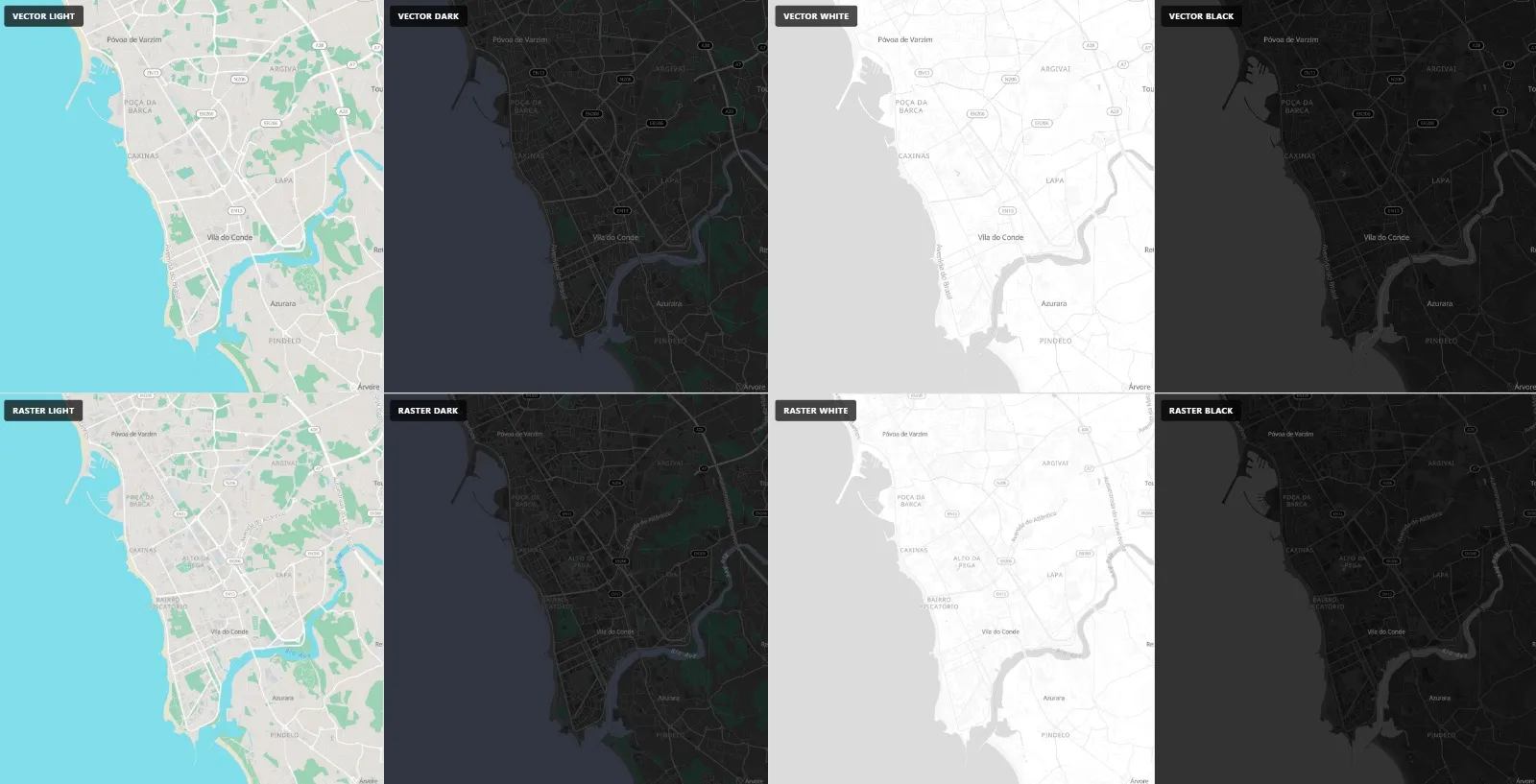
Add Tileserver-GL to your existing stack. This server reads the same PMTiles archive and renders pre-rendered PNG tiles on demand:
Protomaps Daily Builds (.pmtiles)
    ↓
go-pmtiles (serve archive)
    ↓
Tileserver-GL (render raster)
    ↓
Nginx (proxy + static files)
    ↓
Client (QGIS, Leaflet, MapTalks, MapLibre, etc.)
This gives you dual output from a single data source: vector for browsers, raster for everything else.
Architecture
Three Docker containers:
services:
  pmtiles:
    image: protomaps/go-pmtiles
    container_name: pmtiles-server
    command: serve /data
    restart: always
    volumes:
      - ./data:/data

  tileserver:
    image: maptiler/tileserver-gl
    container_name: tileserver-gl
    restart: always
    ports:
      - "8081:8081"
    extra_hosts:
      - "host.docker.internal:host-gateway"
    volumes:
      - ./data:/data
      - ./public/sprites:/data/sprites:ro
      - ./data/styles-raster:/data/styles-raster:ro
      - ./data/fonts:/data/fonts:ro
    command: --config /data/styles-raster/config.json --port 8081

  webserver:
    image: nginx:alpine
    container_name: nginx-protomaps
    restart: always
    ports:
      - "8080:80"
      - "8443:443"
    volumes:
      - ./conf-sites/nginx.conf:/etc/nginx/nginx.conf
      - ./conf-sites/sites.conf:/etc/nginx/conf.d/default.conf
      - ./public:/usr/share/nginx/html:ro
    depends_on:
      - pmtiles
      - tileserver
Why extra_hosts?
Tileserver-GL needs to access nginx (port 8080) to fetch sprites, fonts, and the underlying vector tiles. Inside the Docker network, localhost points to the container itself, not the host. With extra_hosts, the container resolves host.docker.internal:8080 to the host machine.
Style Separation
The same MapLibre style JSON works differently depending on context:
- Vector (browser): Uses relative URLs resolved through nginx
- Raster (tileserver): Needs absolute URLs pointing to the host
Two style directories handle this:
data/
├── styles-vector/   # Browser reads via nginx
│   ├── black.json
│   ├── white.json
│   ├── light.json
│   └── dark.json
└── styles-raster/  # Tileserver reads directly
    ├── black.json
    ├── white.json
    ├── light.json
    ├── dark.json
    └── config.json
Vector style (browser):
{
  "version": 8,
  "sources": {
    "protomaps": {
      "type": "vector",
      "tiles": ["http://localhost:8080/tiles/20260425/{z}/{x}/{y}.mvt"],
      "minzoom": 0,
      "maxzoom": 14
    }
  },
  "sprite": "/sprites/black",
  "glyphs": "/fonts/{fontstack}/{range}.pbf"
}
Raster style (tileserver):
{
  "version": 8,
  "sources": {
    "protomaps": {
      "type": "vector",
      "tiles": ["http://host.docker.internal:8080/tiles/20260425/{z}/{x}/{y}.mvt"],
      "minzoom": 0,
      "maxzoom": 14
    }
  },
  "sprite": "http://host.docker.internal:8080/sprites/black",
  "glyphs": "http://host.docker.internal:8080/fonts/{fontstack}/{range}.pbf"
}
Tileserver config.json:
{
  "options": {
    "paths": {
      "root": "/data",
      "fonts": "fonts",
      "sprites": "",
      "styles": "styles-raster"
    },
    "domains": ["localhost:8081", "127.0.0.1:8081"],
    "allowedHosts": "localhost"
  },
  "styles": {
    "light": { "style": "light.json" },
    "dark": { "style": "dark.json" },
    "white": { "style": "white.json" },
    "black": { "style": "black.json" }
  }
}
Nginx Configuration
Nginx proxies requests to both go-pmtiles (for vector) and Tileserver-GL (for raster):
server {
    listen 80;
    server_name maps.example.com localhost;

    location / {
        root /usr/share/nginx/html;
        index index.html;
        try_files $uri $uri/ =404;
    }

    # Vector tiles (direct from PMTiles)
    location /tiles/ {
        proxy_pass http://pmtiles:8080/;
        proxy_set_header Host $host;
        proxy_cache_bypass $http_upgrade;
        add_header Access-Control-Allow-Origin * always;
    }

    # Styles (vector style for browser)
    location /styles/ {
        alias /data/styles-vector/;
    }

    # Raster tile endpoint (via tileserver)
    location /raster/ {
        proxy_pass http://tileserver-gl:8081/;
        proxy_set_header Host $host;
    }
}
Integration Examples
MapLibre GL JS (Vector - Recommended)
const map = new maplibregl.Map({
    container: 'map',
    style: 'http://localhost:8080/styles/dark.json',
    center: [-8.70, 41.18],
    zoom: 13
});
MapLibre GL JS (Raster)
const map = new maplibregl.Map({
    container: 'map',
    style: {
        version: 8,
        sources: {
            'raster-tiles': {
                type: 'raster',
                tiles: ['http://localhost:8081/styles/dark/{z}/{x}/{y}.png'],
                tileSize: 256
            }
        },
        layers: [{
            id: 'simple-tiles',
            type: 'raster',
            source: 'raster-tiles'
        }]
    },
    center: [-8.70, 41.18],
    zoom: 13
});
Leaflet (Raster Only)
Leaflet doesn’t support vector tiles natively. With raster tiles:
const map = L.map('map').setView([41.18, -8.70], 13);

L.tileLayer('http://localhost:8081/styles/dark/{z}/{x}/{y}.png', {
    maxZoom: 14,
    attribution: '© OpenStreetMap contributors'
}).addTo(map);
MapTalks (Raster Only)
MapTalks is a popular Chinese mapping SDK that expects XYZ raster tiles:
const map = new M.Map('map', {
    center: new M.P oint(41.18, -8.70),
    zoom: 13
});

const layer = new M.TileLayer('http://localhost:8081/styles/dark/{z}/{x}/{y}.png', {
    attribution: '© OpenStreetMap contributors'
});

map.addLayer(layer);
QGIS (Both)
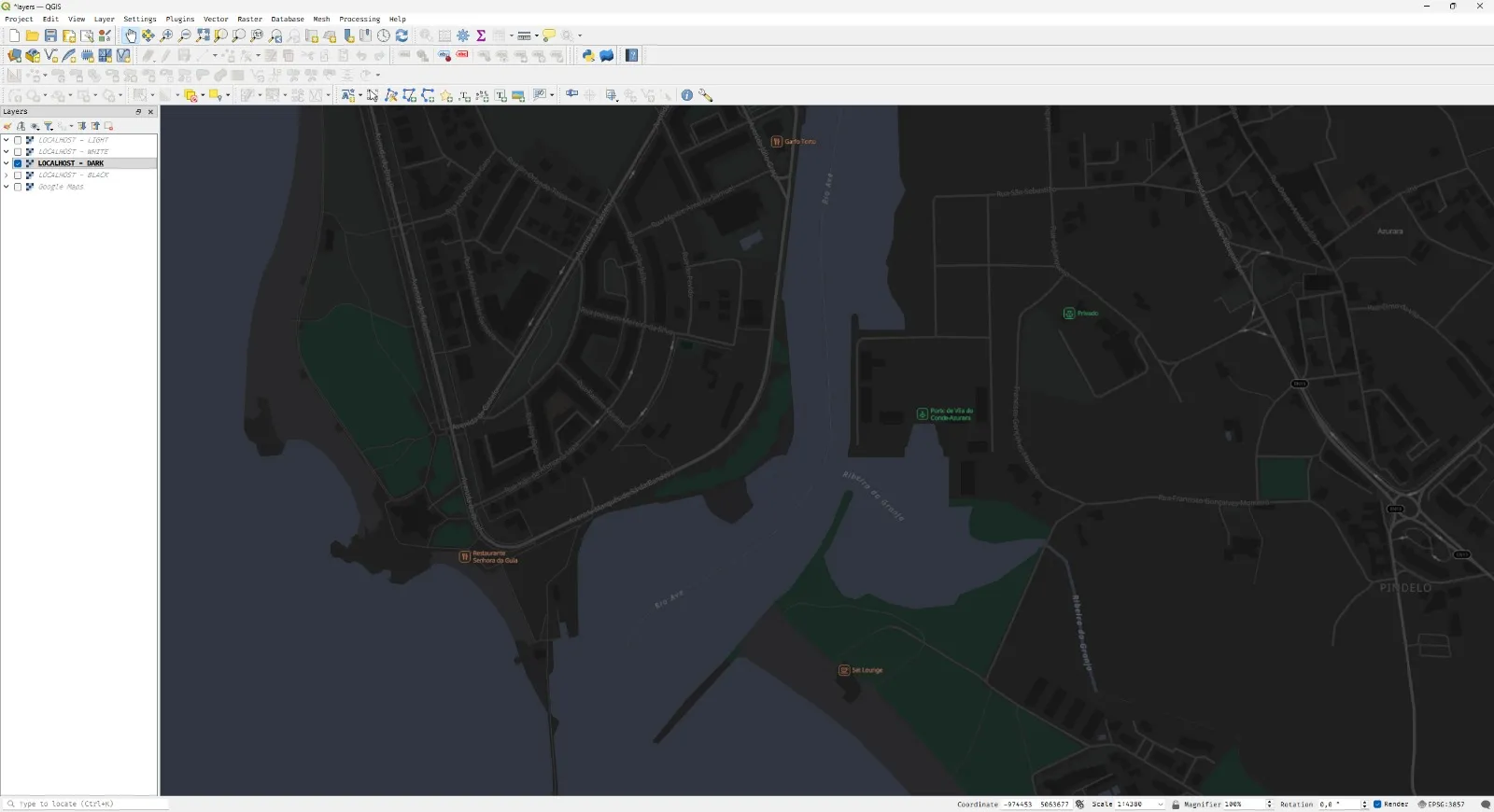
QGIS supports both vector and raster tiles from the same endpoints.
Vector tiles (native support since QGIS 3.18):
Layer → Add Layer → Add Vector Tile Layer
URL: http://localhost:8080/styles/dark.json
Raster XYZ tiles (recommended for full compatibility):
Layer → Add Layer → Add XYZ Tile Layer

URL: http://localhost:8081/styles/dark/{z}/{x}/{y}.png
In the XYZ dialog:
- Name: Dark Raster Tiles
- URL:
http://localhost:8081/styles/dark/{z}/{x}/{y}.png - Max zoom: 14
- Min zoom: 0
You can add multiple XYZ layers with different styles — one per color theme.
Directory Structure
maps/
├── docker-compose.yml
├── conf-sites/
│   ├── nginx.conf
│   ├── sites.conf
│   └── certs/
├── data/
│   ├── fonts/
│   ├── styles-vector/
│   │   ├── black.json
│   │   ├── white.json
│   │   ├── light.json
│   │   └── dark.json
│   ├── styles-raster/
│   │   ├── black.json
│   │   ├── white.json
│   │   ├── light.json
│   │   ├── dark.json
│   │   └── config.json
│   └── 20260425.pmtiles
├── scripts/
│   ├── update.sh
│   └── update-assets.sh
└── public/
    ├── index.html
    └── sprites/
Updates
The update workflow is identical to Part 1. Download the latest Protomaps daily build and atomic swap:
# Update PMTiles data
/opt/protomaps/scripts/update.sh

# Assets (fonts, sprites) stay the same.
/opt/protomaps/scripts/update-assets.sh  # Run once at setup
Conclusion
Self-hosting vector tiles isn’t enough. Geographic tools span decades of technology: GIS, Leaflet, MapTalks, mobile SDKs, offline maps. They all expect raster XYZ tiles.
By adding Tileserver-GL to your stack, you get:
- One data source: Single PMTiles file powering everything
- Dual output: Vector for web browsers, raster for legacy tools
- Full compatibility: QGIS, Leaflet, MapTalks, mobile apps, offline maps
- True sovereignty: Your maps work even when the browser can’t render vectors
Your maps. Your server. Your rules.